Reading your dashboard.
Once reports start arriving, your dashboard is mission control. Here's what every card is telling you, top to bottom.
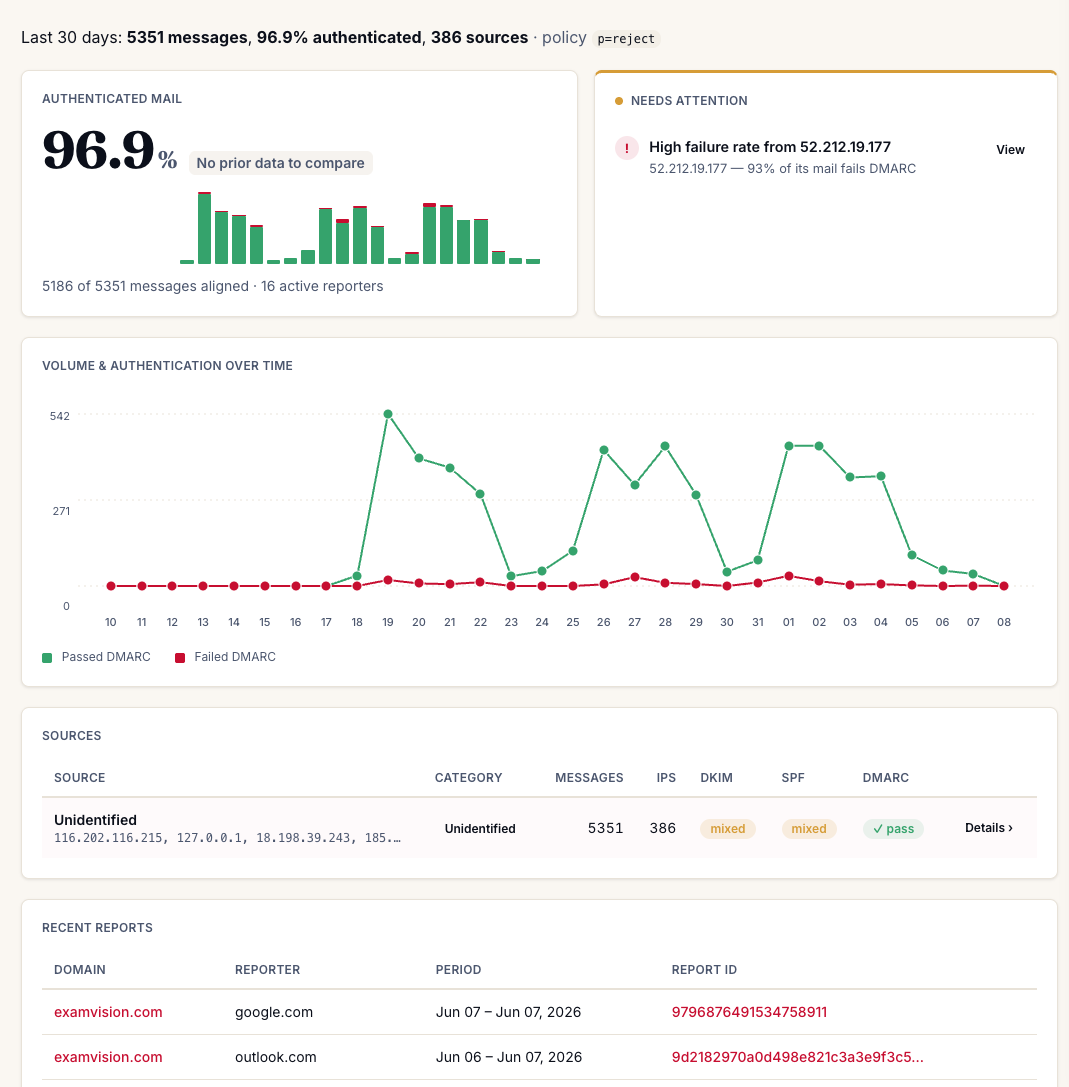
The top line
The summary strip sets the scene: total messages seen, the share that authenticated, how many
distinct sources sent them, and your current published policy
(p=none,
quarantine, or
reject). Up top you'll also find the
period selector (7 / 30 / 90 days) and, if you monitor
more than one domain, the domain switcher to flip between
them.
Authenticated mail: your headline number
The big percentage is the share of your mail that passed DMARC, meaning it authenticated and aligned. "Aligned" is the key word: the domain that passed SPF or DKIM has to match the domain in your From address, so a spoofer can't borrow someone else's passing signature.
- "X of Y messages aligned": the raw count behind the percentage.
- "N active reporters": how many mailbox providers are currently sending you reports. More reporters = a more complete picture.
- The trend chip compares this period to the one before (it reads "no prior data to compare" until there's a previous period to measure against).
- The mini bars are daily volume (green passed, red failed): a quick glance at your week.
Needs attention: what to look at first
dmarcula surfaces the things actually worth your time here, for example: "High failure rate from 52.212.19.177 (93% of its mail fails DMARC)." Hit View to investigate. A source failing hard is one of two things: a legitimate sender you haven't set up yet (fix it before you enforce), or a spoofer (good: DMARC is catching it).
Volume & authentication over time
The trend line plots Passed DMARC (green) against Failed DMARC (red) across your selected period. What you want is a healthy green line with the red hugging the bottom. A sudden red spike is worth a look: a new sender came online, or someone started spoofing you.
Sources: who's sending as you
Each row groups a sending source, showing its message count, how many IPs it spans, and its DKIM / SPF / DMARC results. A pass pill means aligned and authenticated; mixed means some of that source's mail passes and some fails, usually worth a closer look. The category label helps you recognise known email providers at a glance, and Details drills into a single source.
Recent reports
The raw aggregate reports as they land: which domain they cover, the reporter (the mailbox provider that sent it: Google, Outlook, and so on), the period it covers, and its report ID. This is the raw stream underneath everything else on the page. dmarcula parses it so you don't have to read XML.
What's next
- Investigating sources: drill into a single sender and figure out what's going on.
- The enforcement journey: when your numbers look clean, tighten your policy safely.