Who is sending as your domain?
A "source" is whoever's sending email as your domain: your real services, and sometimes people you'd rather not. Your DMARC reports list every one of them. The source drawer is where you figure out which is which, and what to do about it.
Opening a source
From the Sources table on your dashboard, click Details on any row. The drawer slides open with everything dmarcula knows about that sender, gathered into one scroll so you don't have to go hunting across a dozen lookup tools.
What the drawer tells you
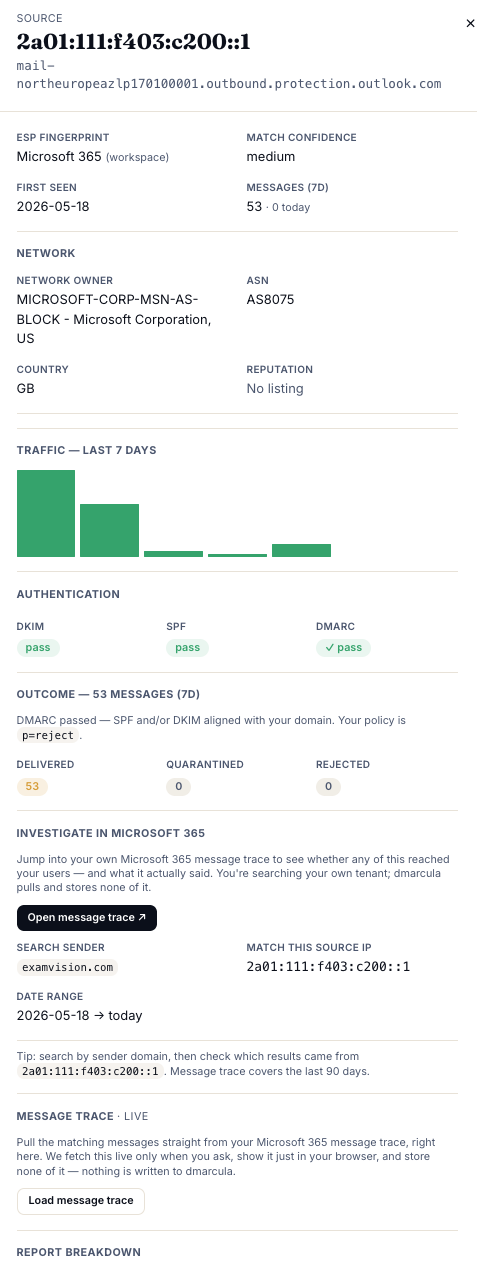
- Identity. The source IP and its reverse-DNS name, plus our ESP fingerprint and a match confidence, so a row reads "Microsoft 365", "Google", "Mailchimp", or Unidentified when it's not a provider we recognise. You'll also see when it was first seen and its recent message count.
- Network. Which network the source lives on (owner, ASN, and country), plus a reputation flag from public blocklists. This is how you tell a real email service from a random hosting box, and there's a 7-day traffic bar chart for shape.
- Authentication. How this source's mail did on DKIM, SPF, and DMARC.
- Outcome. Of those messages, how many were delivered, quarantined, or rejected under your current policy, so you can see your policy actually working.
- Investigate in Microsoft 365. If the domain is your own Microsoft 365 tenant, you can pull a live message trace to see whether this mail actually reached your users and what it said. It runs live in your browser when you ask. dmarcula stores none of it.
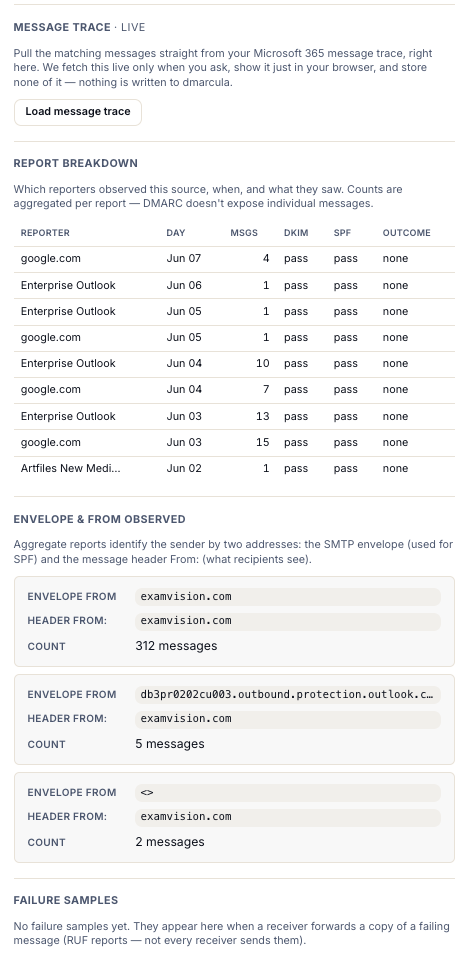
- Report breakdown. Which reporters (mailbox providers) observed this source, on which days, and what they saw. Counts are aggregated per report, and DMARC never exposes individual messages.
- Envelope & From observed. Aggregate reports identify a sender by two addresses: the SMTP envelope (used for SPF) and the header From (what recipients see). Seeing them side by side is where alignment problems give themselves away.
- Failure samples. When a receiver forwards a copy of a failing message (an RUF sample), it shows up here. Not every receiver sends them.
Making the call
Once you can see who a source is and how it's authenticating, triage usually falls into three buckets:
- A service you actually use, but it's failing. Your marketing platform, ticketing system, or invoicing tool, sending on your behalf without proper auth. This is the important one: set up SPF and DKIM for it so it aligns before you enforce, or you'll block your own mail.
- A sender you don't recognise, failing hard. A known provider you've never used, or a sketchy network with a bad reputation and a high failure rate. That's likely spoofing or abuse, and DMARC catching it is exactly the point. No fix needed; enforcement is what shuts it down.
- Unidentified, low volume, failing quietly. Often mailing lists or forwarding (which breaks SPF), or a stray script someone stood up. Worth a glance, rarely urgent, and a valid DKIM signature usually rescues forwarded mail anyway.
The goal: every legitimate source identified and aligned. Once your real senders all pass cleanly, the failing mail that's left is the stuff you want to block, and you can climb to enforcement with confidence.
What's next
- The enforcement journey: with your sources clean, tighten your policy safely.
- Reading your dashboard: where the Sources table lives.