SPF fails but DMARC passes.
You open a source (Postmark, SendGrid, Mailchimp, a Google Workspace relay) and SPF is a red
fail, yet DMARC is a green
pass. Nothing is broken: this is DMARC
alignment doing its job. Here's what's actually happening, and the one right way to tidy it up.
Short answer: your mail is fine. ✓ DMARC only needs
one of SPF or DKIM to line up with your domain. Your
email provider is signing DKIM and it lines up, so DMARC
passes and your mail is delivered, even on p=reject.
The SPF fail is cosmetic.
Why SPF "fails" here
The disticnction between SPF passing and SPF alignment is crucial here:
-
SPF checks the envelope sender: the hidden bounce
address, not the
From:your recipients see. -
Email providers use their own bounce domain. Postmark
sends with
pm.mtasv.net, SendGrid with its own, and so on. SPF passes for that domain, but it isn't yours, so it can't align with yourFrom:domain. - How DKIM satisfies DMARC: Your provider signs each message with a key published on your domain, that signature aligns, and DMARC passes on DKIM alone. That's by design. It's exactly how DMARC is meant to work.
Don't "fix" it by editing your SPF record. Do not add your provider's include: to your SPF record. It will pass SPF, but it won't achieve alignment. It makes SPF pass but still not align (alignment is about the
bounce domain matching your From:, not about
SPF passing). You'd gain nothing and burn into SPF's hard limit of 10 DNS lookups.
The correct fix (optional)
If you want SPF to align as well as DKIM, the correct lever is a custom Return-Path (a custom bounce domain) at your email provider. It hands you a small DNS record on a subdomain of your own domain; once it's in place, the envelope sender becomes yours and SPF aligns. Now both mechanisms pass, useful redundancy if DKIM fails (for example, if a forwarder rewrites the message in transit)
It's genuinely optional. DKIM alignment already carries DMARC, apply this to your high-volume senders first. DKIM alignment alone is sufficient for DMARC compliance.
Worked example: Postmark
Postmark is a common one, so here's the loop, end to end:
- In Postmark, go to Sender Signatures → DNS Settings for your domain.
-
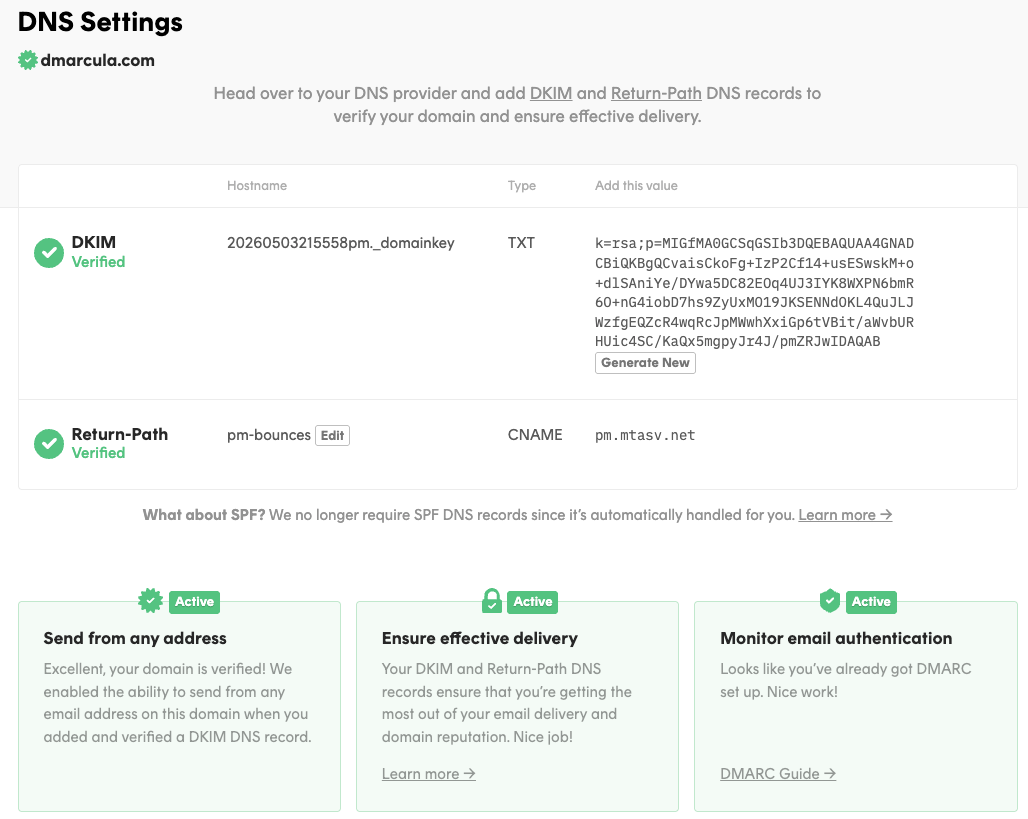
Find the Return-Path row. Postmark gives you a
CNAME: hostpm-bounces(sopm-bounces.yourdomain.com) pointing atpm.mtasv.net. -
Add that
CNAMEat your DNS host. Postmark flips the Return-Path row to Verified once DNS propagates (usually minutes). -
Give the mailbox providers a day to report on the new mail, then reopen the source here. SPF will
flip to
passand align. DMARC stays green throughout.
Notice what's not on that screen: an SPF record to edit. Postmark spells it out: "We no longer require SPF DNS records since it's automatically handled for you." The Return-Path CNAME is the whole job; leave your domain's SPF record alone.
Other providers (SendGrid, Mailchimp, Mailgun, etc.) call it different names ("link branding," "domain authentication," "custom bounce domain") but it's the same idea: a record on your domain so the bounce address becomes yours.
Keep reading
- DMARC, SPF & DKIM in plain English: what "alignment" really means.
- Investigating sources: read any sender's authentication story in the source drawer.
- Glossary: envelope sender, alignment, Return-Path, and the rest.
Still unsure whether a source is safe to ignore? Email support@dmarcula.com with the source and what you're seeing, and we'll take a look with you.